About Mii-monitor
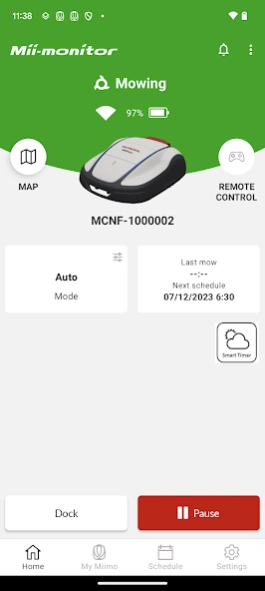
Mii-monitor app gives you complete control of your Honda Miimo robotic mower for the following models: HRM1000, HRM1500, HRM1500 Live, HRM2500, HRM2500 Live and HRM4000 Live. Connect to any Miimo by short range bluetooth...
Mii-monitor app gives you complete control of your Honda Miimo robotic mower for the following models: HRM1000, HRM1500, HRM1500 Live, HRM2500, HRM2500 Live and HRM4000 Live.
Connect to any Miimo by short range bluetooth connection. Or connect to Live Miimos via long range mobile network connection* from anywhere in the world, whether you are at home, on holiday or at the office. Remote connectivity, GPS tracking and the weather-based Smart Timer make mowing your lawn with a Live Miimo easier than ever.
Monitoring:
- Check Miimo's status
- View Miimo's last mow and next schedule at a glance
- Push notifications for errors, maintenance and security*
- GPS tracking*
- Geofence security system*
- Set Free Zones for Miimo to temporarily avoid mowing in*
- Manage a fleet of multiple Miimos, including Multi Miimo installations*
Control:
- Start, pause, home
- Change mode
- Remote control
- Automatic height adjustment**
- Intuitive timers - weekly, monthly, seasonal and quiet
- Avoid mowing in wet or dry weather with our Smart Timer*
- Automatic seasonal timer*
- Advanced settings
- Setup wizard
- Over the air Miimo firmware update*
- Save and restore your settings or your original dealer settings
Support:
- Send trouble reports to dealer
- Remote dealer support to solve common setup problems
*Live models only
**HRM4000 Live only
This app is exclusively for customers of the following Miimo models: HRM1000, HRM1500, HRM1500 Live, HRM2500, HRM2500 Live and HRM4000 Live. If you have an HRM3000 Live, please download the Mii-monitor - HRM3000 Live app. If you have an HRM40 Live or HRM70 Live, please download the Mii-monitor - HRM40/70 Live app. If you have a standard HRM3000 with bluetooth connectivity, please download the Mii-monitor - HRM3000 Bluetooth app.
Previous Versions
Here you can find the changelog of Mii-monitor since it was posted on our website on 2024-08-20 00:57:50.
The latest version is and it was updated on 2026-10-12 23:21:01. See below the changes in each version.
Mii-monitor version
Updated At: 2026-07-17
Changes: We have made improvements such as reducing the crash rate. There are no changes to the functionality you use.
Mii-monitor version
Updated At: 2026-07-02
Changes: Fixed an issue on Android where the app could crash when opening the timer settings screen.
Dealer login has also been improved so that when a large number of Miimo machines are returned, filters can be refined without returning to the login screen.
Support for Android 17 has been added.
Mii-monitor version
Updated At: 2026-06-24
Changes: Improved the Miimo list experience during dealer login when handling a large number of machines.
You can now refine your search without being redirected to the login screen.
Support for Android 17 has been added.
Mii-monitor version
Updated At: 2026-05-11
Changes: Bug fixes and improvements to Android language display consistency.
Mii-monitor version
Updated At: 2026-01-09
Changes: We have now complied with Google Play's "Support 16 KB page size" policy. There are no changes to the functionality you use.
Mii-monitor version 1.1.7 (251002)
Updated At: 2025-10-02
Changes: A few minor fixes added.
Mii-monitor version 1.1.5 (250801)
Updated At: 2025-08-06
Changes: This improvement involves minor changes to the functionality used by Honda dealers. There are no changes for general users.
Mii-monitor version 1.1.3 (20250516) dev
Updated At: 2025-05-19
Changes: Thank you for using Mii-monitor. This release includes improvements for Honda's valued dealers. There is no impact on general customers.
Mii-monitor version 1.1.2 (20250404)
Updated At: 2025-04-16
Changes: Thank you for using Mii-monitor. In this release, we have made some corrections to the expressions in some languages.
Mii-monitor version 1.1.0 (20250206)
Updated At: 2025-02-06
Changes: (1) In setup-wizard, the app asks if there is a narrow passage. Then, the app automatically sets the Miimo passage. This feature is activated when Bluetooth connects using HRM1000 or other models without shortcut wires in your garden. (2) The Read-all button in the notification list was added. You can mark all messages as read. Also, there are some minor fixes.
Disclaimer
Official Google Play Link
We do not host Mii-monitor on our servers. We did not scan it for viruses, adware, spyware or other type of malware. This app is hosted by Google and passed their terms and conditions to be listed there. We recommend caution when installing it.
The Google Play link for Mii-monitor is provided to you by apps112.com without any warranties, representations or guarantees of any kind, so access it at your own risk.
If you have questions regarding this particular app contact the publisher directly. For questions about the functionalities of apps112.com contact us.